Budget-leaking licenses and lightbulb moments
- Most companies are not aware that they overspend on Microsoft licenses
- The main reason for overspending is because ownership is unclear
- Another reason is that third-party licenses are added over time, renew automatically, and are rarely cleaned up
- CSP is not just a purchasing model, it’s a way to create structure, visibility, and ongoing control
- The four-step process we go through in our CSP workshops: strategy, auditing existing setup, mapping third-party solutions and cost optimization.
- The result is fewer wasted licenses, more predictable costs, better security and a cloud setup with less third-party solutions.
If I had a dime for every lightbulb moment where a Head of IT said “Oh, I had no idea” I would be writing this blog from a hammock.
Here’s something most companies recognize when you mention it, even if they don’t always say it out loud:
Their licenses in general are like a black box and no one really knows what’s inside. And when they open up the black box it’s a mess:
- A license gets bought “just for this one survey” and quickly.
- A renewal date is buried in an inbox and slips by (see you in three years)
- A tool sticks around because “it’s only a few hundred a month.”
Multiply that by a few years, a few departments, and a few hundred users and… Well, let’s just say that the bill does not make the CFO do cartwheels.
Why you accidentally overspend on licenses
Overspending on Microsoft licenses rarely happens because someone made a bad decision. It happens because decisions were made at different times, by different people, for (usually) good reasons.
This is even more common as organizations have shifted away from large upfront IT investments and towards subscription-based cloud services. CAPEX turned into OPEX, flexibility increased, and somewhere along the way, day-to-day control quietly slipped.
That’s the context CSP is meant for.
Not just as a way to save on licenses, and not as another vendor relationship, but as a structured way to regain overview, ownership, and financial predictability.
Why CSP Exists (bye-bye EA)
“It was the best of times, it was the worst of times.”
Enterprise Agreements (EA) were designed back when IT looked very different:
Headcount was stable, systems didn’t change weekly and “rolling something out” often involved manuals, onsite training, and yes, the occasional fax machine. You negotiated once, committed for several years, and lived with the outcome.
For some organizations, that still works. For many, it doesn’t.
Companies today change too fast for rigid licensing models to keep up:
- Teams grow and shrink.
- New tools are tested.
- Projects come and go.
And the licensing model, instead of supporting that movement, becomes something you work around.
The problem with traditional licensing
We see the same patterns again and again:
- Licenses are purchased based on assumptions, that were true at the time but aren’t anymore
- Add-ons are added to solve specific problems and collect dust long after the problem disappeared
- Renewals happen automatically because no one has a clear overview of dates and ownership
- Marketing buys third-party tools (often rhyming with TurveyDonkey) without realizing similar functionality already exists in Microsoft 365
None of this is malicious or incompetent. It’s simply what happens when a very large and complex platform is managed without a clear structure and a single point of responsibility.
But you don’t have to live with the endless add-ons, third-party tools and forgotten renewal dates.
What CSP Changes in Everyday Terms
CSP doesn’t magically make licensing simple, but it makes it manageable.
Instead of committing years ahead and hoping your organization still looks the same, CSP allows licensing to adjust as reality changes:
- You can adjust volumes to fit your headcount
- Subscriptions can be reviewed regularly.
- Costs become something you can explain and justify — not just accept.
More importantly, CSP introduces an ongoing relationship where a trusted partner actually looks at how licenses are used, not just how many exist.
That shift alone removes a lot of the silent budget leakers we see in cloud environments.
The 4 steps we go through in a CSP workshop
A lot of CSP providers stop at the transaction. They sell the licenses, send the invoice, and step back.
But that’s not where the real value is because licensing problems are rarely about price. They’re about visibility, (lack of) ownership, and timing. Our process is designed around those realities.
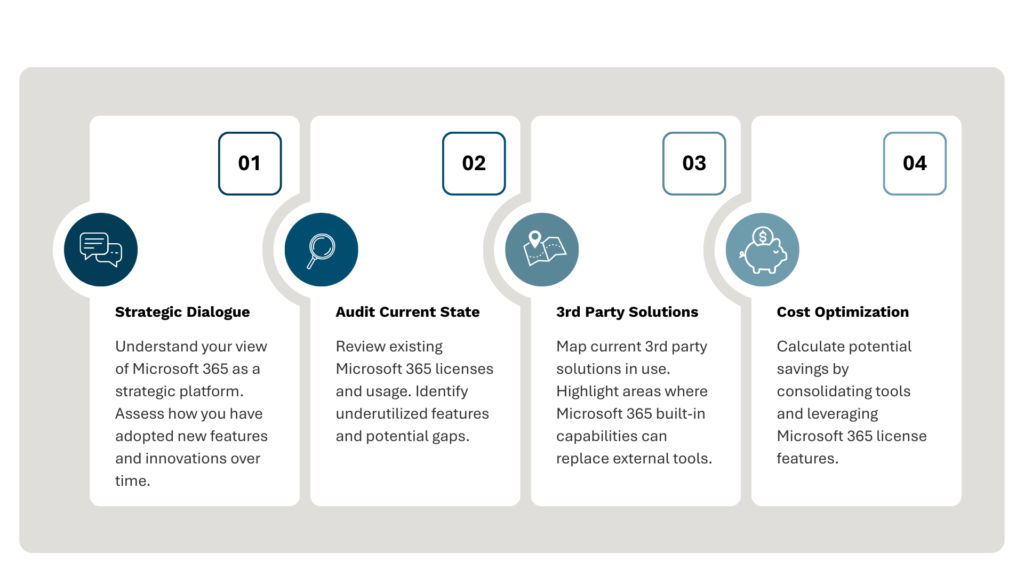
Stage 1: Strategic Dialogue
Are your licenses actually supporting the business?
The very first step is a conversation about your strategy, because Microsoft 365 can be used as a strategic lever. This step is about understanding how Microsoft 365 supports (or doesn’t) the way your organization works and what you want to achieve.
In short, we assess how the business has developed over time and how new features and innovations have followed – or haven’t.
Stage 2: Audit The Current State
What are you paying for and why?
This is where we act as licensing archaeologists. We dig deep and map your current setup, focusing less on theory and more on actual usage.
Instead of treating all users the same, we work with real roles and real needs. A frontline employee, a knowledge worker, and an executive don’t need identical licenses, but many organizations license them as if they do.
That means looking at which licenses are assigned, how they’re being used, and where there’s a mismatch between what was bought and what’s needed today. We also look at subscriptions and add-ons that were introduced for specific projects, as well as tools that overlap in functionality.
Very often, this stage surfaces licenses that made sense at one point but no longer serve a clear purpose. Not because anyone did anything wrong, but because the organization moved on and the licenses didn’t.
The goal here is simple: to get a shared, factual overview of what you’re paying for and why.
Stage 3: third-party solutions
Are you using SurveyDonkey when you could use Forms?
This is a classic that we see all the time: someone needs to send out a survey and they need it done yesterday. Then what happens? Before you can blink, there’s a license for SurveyDonkey.
The license will usually be used for a short period of time until the specific job is done. Afterwards it will probably be forgotten and collect dust – which means it’ll be renewed silently because no one knows the renewal date.
In this step we map all your third party solutions and highlight areas where Microsoft 365 can replace those silent budget drainers.
It might seem like small changes, but it means that control and structure improve significantly.
Stage 4: Cost optimization aka save some money
This is the fun part that usually makes the CFO happy
The final part is where we grab our calculators and see what happens when we weed out and tighten up your Microsoft 365 licenses.
Cloud environments don’t stand still, and licensing shouldn’t either. With CSP, licensing is reviewed regularly, which makes it much easier to respond to changes before they become expensive problems. Headcount changes, new initiatives, and upcoming renewals are addressed proactively instead of reactively.
Let’s take an example from a well-known Danish union:
After auditing and carefully mapping their current state it was clear that their existing E5 licensing was not necessary, so we moved their licenses to a Business Premium solution to match their actual needs.
And the union saved a staggering 500,000 DKK annually by moving their licenses.
Another example was an IT consultancy:
Again we went through the workshop’s four steps and discovered that if we moved their E3 licensing to an E5 they wouldn’t need stand-alone licenses like Defender and Teams because it’s included in the E5.
The move from E3 to E5 gave them more tools and more security without increasing the price.
The four benefits of the four stages in the workshop
 Make sure Microsoft 365 matches your business goals Reduce unnecessary spend on overlapping tools Improve security and compliance by standardizing on Microsoft 365 Get pragmatic insights to use for future roadmap planning
The natural next step → Microsoft Governance Deep Dive
After opening the Black Box of Licensing, we’ll ask some organizations the question “how is your governance setup?” and most organizations don’t really know. And that’s only natural.
If an organization is not sure where it stands about governance, we’ll discuss a Microsoft 365 Governance Deep Dive Workshop as the natural next step.
The Governance Deep Dive Workshop is about assessing your current configuration and governance setup: do you have the foundations in order to comply with regulations (e.g. NIS2) and does it support your strategy. This is not for everyone but it is the natural next step for most organizations.
Show me the money: why this matters to Finance and Procurement
From a financial perspective, the biggest advantage of CSP isn’t lower unit prices. It’s predictability.
When you pay for what you actually use, month by month, it becomes much easier to understand and explain cloud spend. Cash flow is protected, budgets stop leaking through forgotten subscriptions, and conversations shift from “we need this tool” to “what do we already pay for that can help us?”
That change alone often justifies the move.
Think trusted advisor, not just a vendor
A sad truth is that anyone can sell Microsoft licenses. And most vendors do. The keyword here is ‘vendor’.
What most organizations need is someone who helps them decide when not to buy, when to scale down, and when existing tools already solve the problem.
That’s the role of a cloud advisor, and that’s what our CSP process is built to support.
What now?
Jesper Petersen works with several Microsoft MVP’s as a Practice Lead for Microsoft 365 and Security at Mindcore.
To talk further about Microsoft 365 licenses, you can contact Jesper Petersen at phone 31 78 60 62 or mail jp@mindcore.dk.
To talk further about Microsoft 365 licenses, you can contact Jesper Petersen at phone 31 78 60 62 or mail jp@mindcore.dk.
Jesper Petersen works with several Microsoft MVP’s as a Practice Lead for Microsoft 365 and Security at Mindcore.